finance team time-sink reduction: software approaches compared
Reconciliation, closing, and compliance drain finance teams most—here's which tool fixes each.

Finance teams lose the most time to three things, in this order: reconciling accounts between entities, closing the books each month, and pulling together audit and compliance reports. That ranking comes from a 2025 bluQube survey of 700 finance and business leaders and should sound familiar to anyone who has sat through a close cycle. These are the core of what finance actually does every single month, so they're expensive to leave unsolved.
Manual work survives partly because it feels safe. Spreadsheets and email approval chains have worked for years, so teams treat them like a control rather than a risk. Nobody got fired for using the same reconciliation spreadsheet they used last quarter, even when that spreadsheet is held together with formulas nobody remembers writing.
Structurally, every new vendor, every new entity, every new currency doesn't just add work, it multiplies it. A finance team juggling a handful of vendors in one currency can survive on manual coordination. Adding three more entities and two more currencies pushes the math past what's manageable by hand. The workload doesn't grow in a straight line. It grows the way rabbits multiply, except nobody finds rabbits in a spreadsheet charming.
Automating the wrong category of problem
Automation investment and automation payoff are two different things, and the gap between them usually comes down to one question: did the tool match the problem? Most stalled automation projects fail because they're aimed wrong: teams automate a task instead of fixing the process underneath it, or they bolt on software before anyone agrees on what the workflow should actually look like.
The siloed automation trap is the most common version of this mistake. A team automates accounts payable, automates reporting, and automates payroll, each on its own disconnected tool, and then discovers someone still has to move data between the three by hand. The manual work didn't disappear. It just moved one step over and put on a disguise.
A broken workflow doesn't get fixed by automating it. It gets automated at higher speed. Errors that used to take a day to produce now take an hour. Simplifying the steps, assigning clear ownership, and standardizing the rules has to happen before automation gets anywhere near the process, not after.
There's a confidence problem sitting underneath all of this too. Nearly half of finance leaders say they doubt whether their own data is reliable enough to stand up to investor or audit scrutiny. Layering automation on top of data nobody fully trusts doesn't build confidence, it just moves the uncertainty around faster. The fix starts with identifying the single biggest time-sink a team actually has, then matching that specific drain to the software category built to solve it. The rest of this piece is built to make that matching job easier.
RPA: what it solves and what it cannot touch
Robotic process automation is genuinely good at one thing: moving structured, predictable data with zero exceptions. Think fixed-format invoice entry, scheduled report distribution, or static field mapping between two ERP systems. If the input looks the same every time, RPA handles it well and rarely complains.
The ceiling here is a design constraint baked into how the technology works, not a flaw in any particular RPA product. RPA reads structured fields it already expects to see. Most new enterprise data arrives differently. Emails, PDFs, supplier messages, and scanned images make up the large majority of what actually lands in a finance inbox, and RPA can't read any of it without a separate preprocessing layer bolted on, which adds cost and a new place for things to break.
Maintenance is the quiet cost nobody budgets for. That's a recurring tax on every format update for as long as the bot exists, not a one-time setup fee.
RPA handles high-volume structured data entry well. It handles scheduled recurring reports well. It handles static reconciliation matching well, as long as both sides of the match are formatted consistently. What it handles poorly, or not at all: exception handling in reconciliation, month-end close coordination, variance commentary, audit-trail gaps tied to unstructured documents, and anything involving navigating a supplier portal.
The clearest lesson in calibrating automation at scale comes from Klarna in February 2024. Its AI assistant handled work equivalent to 700 full-time agents in a single month, and the company projected large savings from it. Rehiring followed not long after. Both outcomes were predictable before they happened, because getting the mix of automated and human-handled interactions wrong at scale is expensive no matter which direction the error runs.
RPA still earns a place in the stack. It belongs at the bottom layer, where it handles structured data movement while other tools manage everything above it. Deploying it as the whole answer to reconciliation or close problems is simply a mismatch between the tool and the job.
AI agents: the category built for exceptions, unstructured documents, and the work RPA cannot reach
AI agents pick up exactly where RPA runs out of road. Reconciliation with anomalies, variance commentary, natural language queries against the ERP, cross-border transaction matching, audit-trail exceptions buried in unstructured documents. These are the time-sinks that hurt the most and that traditional automation can't touch.
The architecture is the real difference. RPA runs a predefined script and nothing more. AI agents analyze data as it comes in, read unstructured inputs like a handwritten invoice or a supplier contract with terms that shift from deal to deal, and improve their own decision-making through feedback over time. One follows a script. The other reads the room.
IRIS Carbon's 2025 finance automation guide describes this shift directly: AI flags anomalies, inconsistencies, narrative gaps, and mismatched values before a human ever notices them, turning review from something reactive into something continuous. Instead of catching a problem during the audit, the system catches it while the ink is still wet.
Accounts receivable and invoice workflows show this gap especially well. IRIS Carbon puts the manual time loss at nearly 44 hours a week across a finance team, and traditional manual invoice processing can take days per invoice. AI agents can navigate supplier portals, chase outstanding payments, track down missing documents, and escalate when something stalls, handling the unglamorous blockers that no RPA script was ever built to touch.
It runs as an AI-powered accounts receivable team that follows up with customers, replies to them directly, moves through portals like Coupa and Ariba, chases missing paperwork such as W-9s, and keeps pushing each invoice until the cash actually lands. The combination that makes it work is pairing automation with the kind of persistent, human-like follow-up suppliers tend to actually respond to, rather than ignore like another automated email.
None of this comes free of risk. When an AI agent has too much autonomy, it creates real governance gaps, questions about whether cost matches value, and explainability problems, and those matter enormously in SOX-regulated environments where every decision needs a paper trail someone can defend. A large majority of finance organizations report that their AI rollouts moved slower than they expected, and only a minority say they've seen clear, measurable ROI. Governance and integration readiness are the real bottleneck.
Purpose-built close and reconciliation platforms: the mid-market's most defensible automation investment
Between the full-stack ERP and the single-function bot sits a category built specifically for the two time-sinks finance leaders rank highest: reconciling accounts between entities and closing the books each month. Automated reconciliation technology delivers reconciliations 85% faster, so this is the highest-leverage place for most finance teams to start spending.
The market backs that up. Close automation and reconciliation software has grown into an estimated several-billion-dollar category, expanding steadily, a sign that CFO budgets are concentrating here and that vendor competition has matured enough to produce real differences between products worth comparing.
BlackLine is the leader for reconciliation depth, transaction matching volume, and SOX-grade controls. A SaaS company used BlackLine's transaction matching and account reconciliation tools and saved significant time on billing every month, and it meaningfully shortened its close cycle, a result Nucleus Research confirmed. Red Wing Shoe Company, a retail customer, eliminated a large volume of monthly reconciliations and hit a 4.8-month payback period. A solar asset owner cut the number of days it needed to complete financial close and got rid of overtime requirements. BlackLine's Verity AI suite launched in September 2025, and early adopter data from Q2 2026 showed a large reduction in accruals process time, major savings in manual prep work, and one collections workflow that dropped from dozens of hours down to a matter of minutes.
FloQast wins most mid-market decisions for a different reason: speed and simplicity. It deploys in two to eight weeks, often led internally without outside consultants. Its design philosophy fits onto the close process a team already runs instead of asking them to redesign it from scratch, which lowers the change management risk considerably. An AI agent push is central to where the product is heading next.
IRIS Carbon's automation best practices guide lists connected close, consolidation, and disclosure workflows as one of six recommended practices. If you unify those three, information moves faster, ownership stays clear, and downstream audit revisions drop significantly.
Choosing between the two platforms comes down to two questions. Does the regulatory environment demand SOX-grade controls, and does that favor BlackLine? Does the team have the implementation staff to support a longer rollout, or does it need a shorter runway, and does that favor FloQast? Neither platform wins outright, it depends entirely on which constraint matters more to the team making the call.
FP&A and reporting tools: reclaiming forecasting hours and the data-gathering burden
Close and reconciliation aren't the only places time disappears. A large share goes to gathering and processing data just to build a forecast or a report. Finance teams that adopt FP&A tools report reclaiming 37 hours a month that used to go to manual modeling and reporting, hours that are structurally unavailable for the scenario planning and analysis leadership keeps asking for.
Systems that never talk to each other are the underlying problem. Expenses sit in one tool, actuals live in the ERP, budgets get built in spreadsheets, and none of it syncs automatically. Before any real analysis can happen, someone has to export, import, reconcile the mismatches, manage version control, and stitch together a consolidated view by hand.
IntelliPay's analysis of finance team workflows points to three specific processes that eat the most time this way: budgeting in spreadsheets, revenue estimation, and pulling together performance data from multiple systems. FP&A platforms consolidate all three, which also clears up the version control confusion and collaboration gaps that come from five people editing five different copies of the same budget.
You can see what connected reporting unlocks in how teams use monday.com's workflow automation. Playtech saw a meaningful jump in efficiency and saved three hours per person every week, and its Head of Projects said the team could finally show management project costs broken down week by week, something that used to be a guessing exercise. Citizens Bank used automated workflows to process a large volume of PPP loans while protecting thousands of jobs, saving tens of thousands of manual actions every month in the process.
This manual work carries a cost that doesn't appear on a balance sheet. Finance professionals hired specifically for their analytical judgment end up spending most of their time on data entry and matching instead. That mismatch between what someone was hired to do and what they actually do all day drives burnout and turnover, and institutional knowledge walking out the door is one of the hardest losses for a finance department to recover from.
Matching your biggest time-sink to the right software category
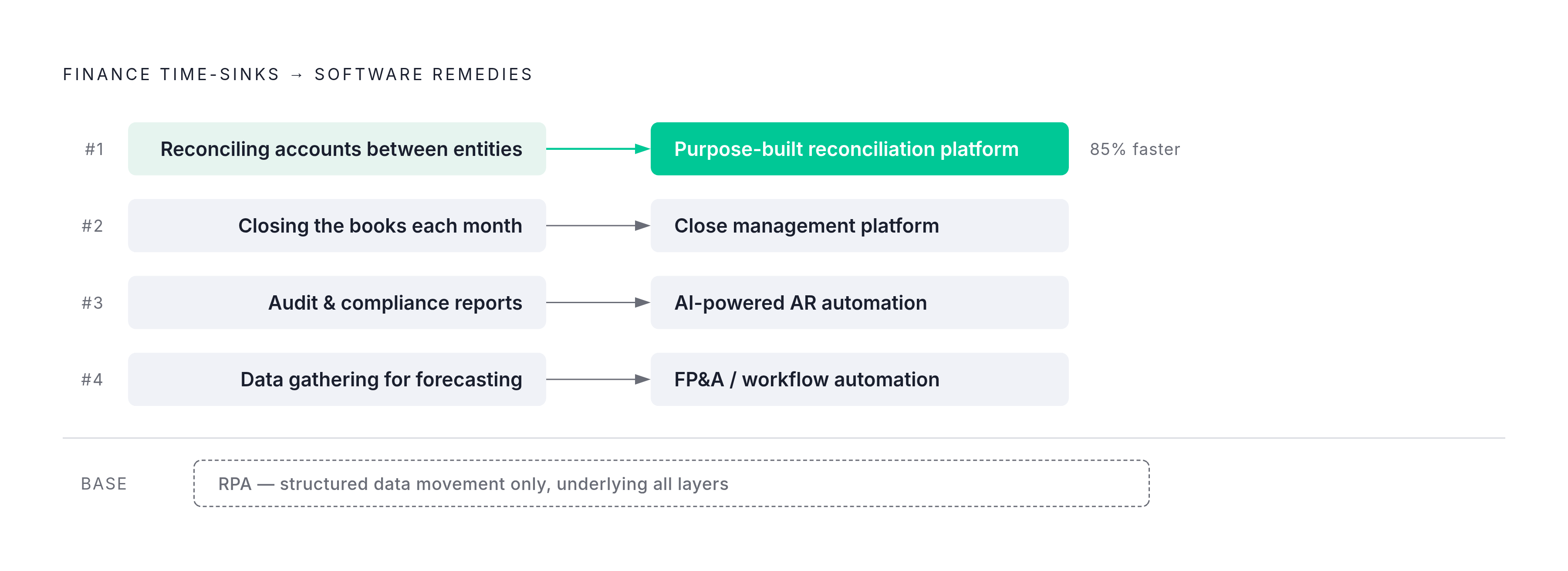
The ranked list of time-sinks from the bluQube data, reconciliation, month-end close, audit and compliance, and data gathering for forecasting, maps onto distinct software categories cleanly enough that the matching exercise isn't complicated. The first move is identifying which pain point ranks highest for a given team, then picking the category built for that exact problem.
If you need reconciliation between entities, start with a purpose-built reconciliation platform. BlackLine suits enterprise teams that operate under SOX requirements, FloQast suits mid-market teams that need speed to value, and AI agents fit in wherever the reconciliation work is exception-heavy or crosses currencies and borders.
For month-end close, close management platforms again split along the same lines, FloQast for teams that want to adopt fast, BlackLine for teams that need deeper control, paired with connected disclosure workflows that tie the close process directly into reporting.
For invoice and payment workflows and AR collections, the category that fits is AI-powered AR automation built to handle the full chase cycle: navigating portals, following up with customers, resolving missing documents, escalating when something stalls. A managed AR service can run this as an always-on AR function across portals like Coupa and Ariba, with the kind of persistent follow-up that a purely automated tool can't replicate on its own.
For data gathering tied to forecasting and reporting, FP&A and workflow automation tools do the job, unifying actuals, budgets, and forecasts inside one system everyone trusts instead of five spreadsheets nobody fully does.
For high-volume, structured data movement with no exceptions, RPA remains the right fit, sitting quietly at the bottom of the stack and doing the one job it was always built to do well.
Getting the category right matters, but it isn't the only variable. Whether that right choice pays off or sits half-configured for a year depends on implementation capacity. A team without dedicated implementation staff that signs up for a long, consultant-heavy rollout risks the same stalled-ROI story that sinks so many automation projects. Match the tool to the time-sink, then match the rollout to the team that actually has to run it.