Integrating AR Automation with ERP Systems
Connecting AR automation to your ERP closes the gap where manual work kills cash flow.
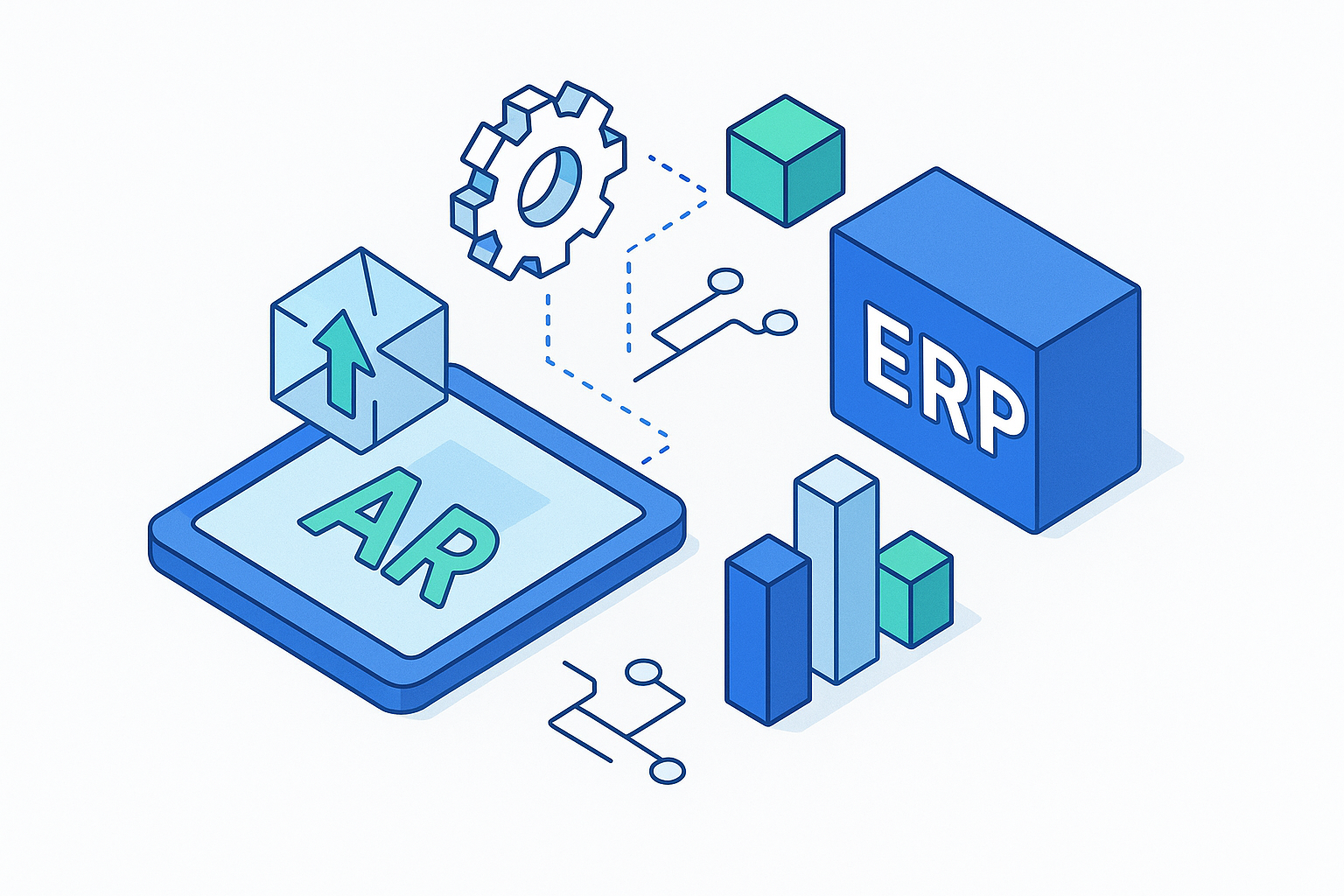
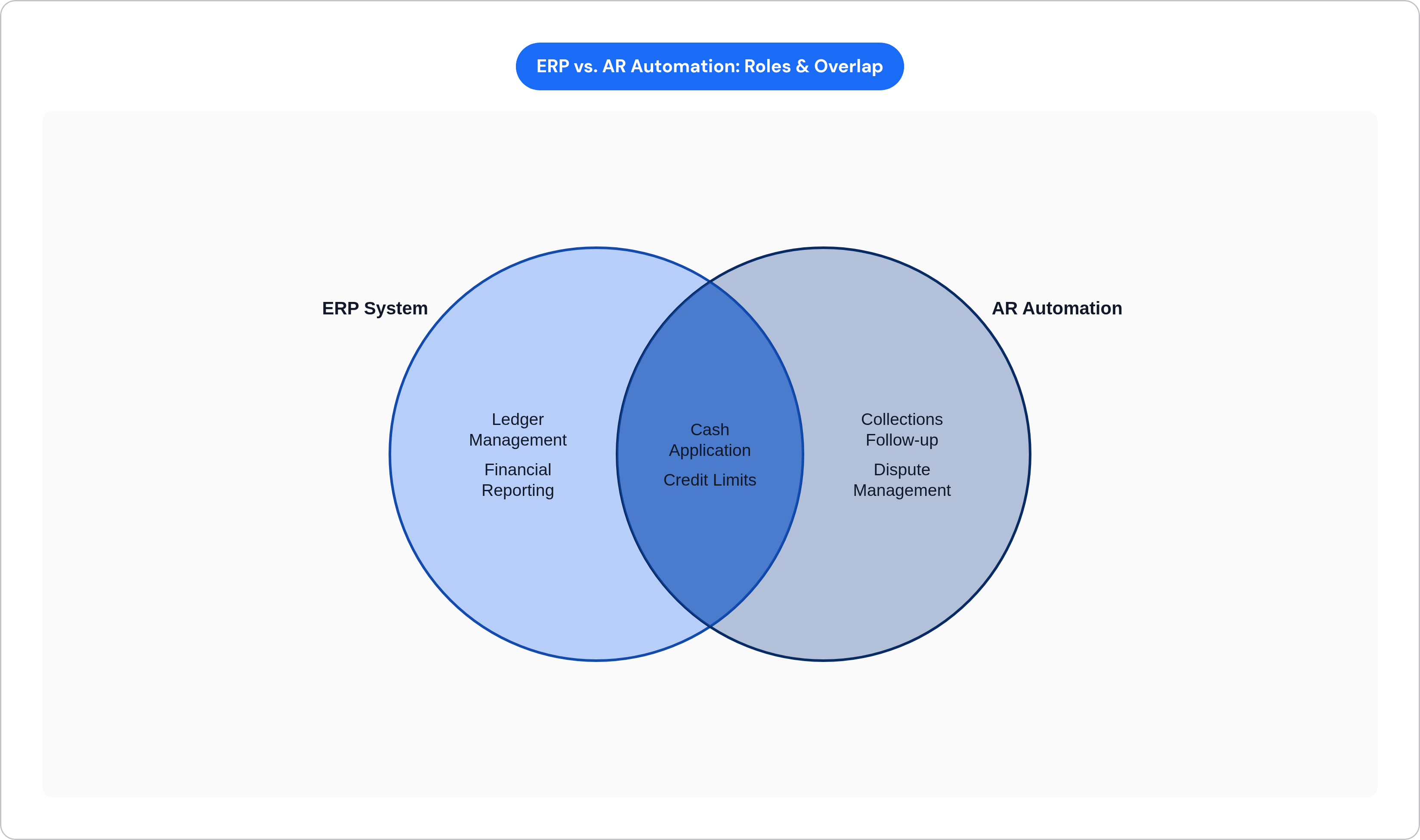
Most ERP systems are genuinely excellent at the things they were built to do. Ledger management, financial reporting, record-keeping. But somewhere along the way, a lot of finance teams started expecting their ERP to also run the operational side of accounts receivable. And that is where things get messy. The ERP was not built to chase invoices. It cannot parse a remittance advice that arrives as a PDF with no PO number and a vague memo line. It was not built to manage the back-and-forth of a disputed deduction or auto-route an invoice to a supplier portal. Think of your ERP as a brilliant archivist: it will catalog everything you hand it with perfect precision, but it will not go out into the world to collect what is owed. So finance teams fill the gap manually. They export aging reports. They send follow-up emails by hand. They reconcile payments in a spreadsheet that lives outside the system. That manual middle layer is exactly where time disappears and cash slows down. Closing that gap is what connecting a purpose-built AR tool to your ERP is actually about. Not the connection itself. What the connection makes possible.
What AR-ERP integration means structurally, and what it does not
Here is the most important thing to understand before anything else: integration is not a data export. A one-way CSV file pulled from the ERP every morning is not integration. Real integration is a live, two-way relationship where both systems read and write each other's data.
What flows out of the ERP into the AR platform:
Customer master records
Open invoices
Blocked orders
Credit limits
What flows back from the AR platform into the ERP:
Payment postings
Dispute status updates
Credit changes
Resolved deductions
The direction of the return flow is the part most people underestimate. If payments processed in your AR tool do not post back to the ERP quickly and accurately, your ledger becomes a fiction. And you are making decisions based on it.
There are two main architectural models worth knowing. The first is native ERP integration, where the AR automation lives inside the ERP and posts to the ledger at the moment of the transaction. The second is a standalone AR tool that runs in its own environment and syncs back to the ERP on a schedule via API or middleware.
The distinction matters in practice. In a sync-based model, the ERP's aging data will always lag behind what the AR platform sees. That lag means collections sequences can fire on balances that have already been paid. Unapplied cash accumulates in the gap. Month-end close still requires a reconciliation pass to catch what did not sync cleanly.
Well-built third-party AR tools can outperform native ERP modules in terms of usability and configurability. That is not really in dispute. The real question is whether the integration is reliable enough that the AR platform and the ledger stay in agreement under real-world conditions. Not in a demo. In production, when volume is high and formats are inconsistent.
Integration is plumbing. What it enables is the value.
The four integration points where AR automation does its work
There are four places where the ERP-to-AR connection has to function cleanly. Each one is also a potential gap.
Invoice creation and delivery
The AR platform pulls invoice data from the ERP at the moment of creation. It routes the invoice to the right delivery channel. That might be email, a PDF attachment, or a supplier portal like Coupa or Ariba. It tracks delivery confirmation. This eliminates the lag between when an invoice is issued and when a customer actually receives it. That lag matters more than most people think. An invoice that sits undelivered for four days because it was sent to a portal the customer has to manually check does not start its payment clock until it is seen.
Cash application
Payments arrive from multiple sources: ACH, check, wire, portal remittance. They arrive in inconsistent formats. The AR platform's job is to match each payment to the right open invoice and post the result back to the ERP. Unstructured remittance data is where most of the manual work lives in cash application. If your AR tool cannot parse a remittance advice that arrives without a PO number or with mismatched invoice references, someone is matching it by hand.
Collections and follow-up
The AR platform reads open aging from the ERP, applies prioritization logic, and triggers outreach sequences. This is the step most ERPs simply cannot execute on their own. The critical dependency here is data currency. If the aging data coming out of the ERP is 24 hours old, collections may follow up on invoices that were paid yesterday. That creates friction with customers and erodes trust in your AR operation.
Dispute and deduction management
Disputes logged in the AR platform need to flow back to the ERP as credit memos, deduction codes, or hold flags. Without that sync, the same disputed invoice gets followed up on repeatedly. That is not just an efficiency problem. It is a relationship problem. Customers who keep getting contacted about an invoice they already disputed will tell you about it.
Each of these four points is a place where a missed sync, a format mismatch, or an unposted payment sends the wrong signal downstream. Fix all four and the system works. Leave any one of them leaking and you will feel it.
Where integration projects run into trouble before they start
Let me be direct here: most AR automation implementations that go sideways do not fail because the software is bad. They fail because the organizations underestimated what was sitting between them and a working integration.
The most common culprits:
Legacy ERP environments
Poor customer master data quality
Inadequate process mapping before go-live
Unrealistic timelines from the start
Insufficient planning for user adoption
The legacy ERP problem is the one that surprises the most teams. Many companies are running customized SAP, Oracle, or Microsoft Dynamics instances installed before 2015. Those environments often expose only batch exports, not modern APIs. Integration projects quoted at 12 weeks have a documented tendency to stretch to nine months when hidden custom code breaks standard connectors. Each quarterly ERP patch can also invalidate a certified connector and force regression testing. That is an ongoing maintenance cost that rarely appears in the original budget. Organizations that underestimate legacy ERP integration complexity have spent substantially more internal hours than planned. The gap between the estimate and reality is not small.
Data quality is the other blocker that shows up late and hurts early. Remittance advices, credit memos, proof-of-delivery confirmations, and customer POs arrive in inconsistent formats across a real AR operation. Until that unstructured data can be extracted and made consistent, cash application, matching, and reconciliation cannot run automatically. The automation is only as good as the data it is working with.
The failure mode that happens most often looks like this: a finance team signs the contract, hands the integration project to IT, and IT discovers the ERP environment is a version or configuration the vendor's connector does not fully support. The 60-day implementation estimate becomes six months. It is the same story, told over and over — you could call it the oldest joke in enterprise software, except nobody is laughing when it happens to them.
The organizations that avoid this are the ones that do process design, data quality assessment, and change management planning before they go looking for software. Most implementations fail not because of software shortcomings but because the organization focused on features first and foundation second.
What good integration actually produces when it's working
When the integration is actually working, the results are not subtle.
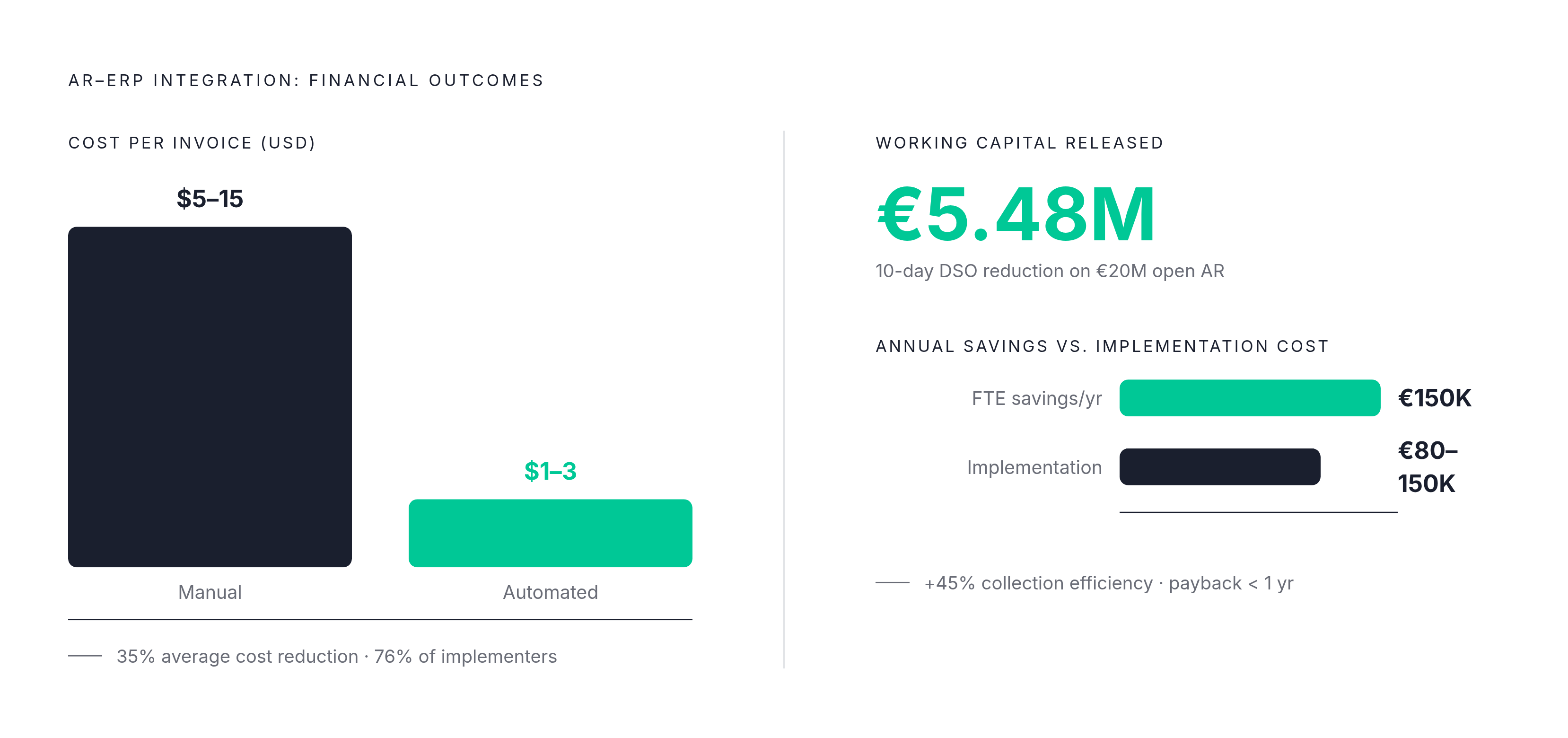
Organizations that augmented their ERP systems with dedicated AR software reported average reductions of 23% in days sales outstanding (DSO) and 25% in days-to-pay. Most reported that third-party AR tools delivered stronger returns than ERP-native capabilities (ERP Today, 2026). And the working capital implications of even a modest DSO improvement are significant. On €20 million in open AR, a 10-day DSO improvement releases roughly €5.48 million in working capital. Cash application automation that reduces the FTE equivalent needed for manual matching can deliver savings in the range of €150K per year. Implementation on a complex ERP typically costs €80,000 to €150,000 depending on the environment. The math tends to work.
On the cost side, manual AR processing runs somewhere between USD 5 and USD 15 per invoice. Automated processing brings that down to USD 1 to USD 3. With invoice volumes projected to increase significantly over the next few years, the gap between those two numbers compounds fast (PYMNTS Intelligence, 2024). About 76% of businesses implementing AR automation reduced invoice processing costs by 35% and improved collection efficiency by 45% (SNS Insider, 2025).
The DSO gains come from a specific mechanism, not a vague notion of "automation." When the AR platform has accurate, current data from the ERP, collections sequences trigger at the right time on the right balances. Persistent, timely follow-up on accurate data is what moves invoices to cash. Automation just makes that follow-up consistent and scalable.
One more thing worth noting: the gains are not distributed evenly. They concentrate in the companies that addressed process design and data quality before going live. The ones that connected the software and waited saw far smaller returns.
How e-invoicing mandates are forcing the integration question
For a long time, connecting AR automation to an ERP was a choice. An efficiency project. Something finance teams did when they were ready. That dynamic is changing fast.
Mandatory e-invoicing is now active in more than 80 jurisdictions (Mordor Intelligence, 2026). More than 40% of the world's countries now require invoices to be sent and reported digitally. More than 60% of finance leaders say e-invoicing will significantly impact their tax management within the next two years (Billtrust, August 2025). Germany is a useful near-term example. Mandatory receipt of e-invoices took effect in January 2025. Issuance mandates phase in starting in 2027. Companies with German customers or operations need ERP-to-AR connections that can produce and receive structured invoice formats. Not PDFs. Structured data.
That changes the conversation entirely. This is no longer purely an efficiency project. An AR platform that cannot meet the format and reporting requirements of the jurisdictions a company operates in creates regulatory exposure. Full stop.
For companies operating across multiple countries, the ERP-AR integration needs to handle different mandate structures, different formats, and different timelines. That is a strong argument for pre-built, actively maintained connectors over custom-built links that do not update when regulations change.
What to evaluate when choosing how an AR tool connects to your ERP
Here is the practical checklist. Not what the sales deck says. What you should actually ask.
Pre-built connectors versus custom integration. Some vendors offer pre-built connectors that support a wide range of ERP systems including SAP, Dynamics, NetSuite, and Workday. Others require custom builds. Pre-built connectors reduce implementation time from months to weeks in most cases. The critical question is not which ERP brand the connector supports. It is which version and configuration of your specific ERP instance it supports. Those are different questions.
Sync frequency and data currency. Understand whether the integration runs in real-time, near-real-time, or batch. Batch syncs mean your collections sequences are running on yesterday's aging. In high-volume AR environments, that creates material errors and customer friction.
Who owns connector maintenance after ERP patches. Ask explicitly who is responsible for re-certifying the connector after each ERP update and what the SLA is for doing so. This is an ongoing operational cost. It should be defined in the contract, not discovered after the first quarterly patch breaks something.
Cash application capability on unstructured data. The quality of the AR platform's ability to parse inconsistent remittance formats determines how much manual matching remains. Ask vendors to show you straight-through processing rates in environments similar to yours. Not best-case demos. Reference customers with comparable data complexity.
Multi-entity and multi-ERP support. If your company runs more than one ERP instance, common after acquisitions, you need to understand whether the AR platform consolidates across those instances or requires separate deployments. Both models exist. Neither is inherently wrong. But you need to know which one you are buying.
Honest implementation timelines. Cloud-native tools built for smaller businesses can go live in one to two weeks. Enterprise solutions in complex ERP environments typically take three to six months for full deployment. A vendor promising enterprise results in SMB timelines on a legacy SAP instance is telling you something important, and it is not what they think they are saying.
Security and compliance controls. AR automation handles sensitive financial data and customer information. GDPR and CCPA compliance, role-based access controls, and audit trails should be table stakes. Not premium add-ons.
The practical test. Ask the vendor to walk you through exactly what happens to a payment posted in the AR platform before it appears in the ERP. Step by step. The specificity of that answer tells you the real state of the integration. Vague answers about "seamless sync" are a yellow flag. A clear, sequential explanation of the data path is what you are looking for.
The connection between your AR tool and your ERP is not where the value lives. But without a clean, reliable, two-way connection, none of the value is accessible. Get the plumbing right and everything downstream works. Skip it and you have just built a more expensive version of the manual process you already had.